Claude
On claude.ai and the Claude desktop and phone apps, every plan including Free.
- Open Settings, then Connectors.
- Press Add custom connector, name it EyeCues, paste the address and press Add.
- Press Connect, sign in to EyeCues and press Allow.
They ask "What time does your flight land Friday?"
Your flight lands in Detroit at 6:40 PM Friday, gate A12.
This is the app that made you want to buy your glasses.
EyeCues is a personal assistant that listens all day, so you never stop to type. When a question comes up, the answer appears in front of your eyes: from your own documents, your past conversations, or what the AI already knows. Just talk, and it takes the notes, saves every conversation, and turns what you say into reminders, lists and calendar events. Works with ChatGPT, Claude, Gemini, Grok and Perplexity. Made for Even G2.
Someone asks when your flight lands. EyeCues finds it in your itinerary and shows it on your lens, with where it came from, before you have to say "let me check." Nothing to tap and nothing to say to it.
They ask "How many therapy visits does my plan cover?"
Dana asks "Did I tell you where my daughter got in?"
They ask "How far is Grand Rapids from here?"
EyeCues listens the whole time you wear your glasses, like an assistant sitting in on your day. There is no app to open and nothing to type. Ask it to do something and it is done before you finish the sentence. Everything else it hears becomes notes, a summary and suggestions you keep with one tap.
Add string cheese to my shopping list.Added on the spot. At the store, ask what's on the list and it reads it back on your lens.
Remind me at 3 to call the school.Saved as you say it. At 3:00 it shows on your lens, and the invite is already in your calendar.
Let me read the sales pitch.Your script opens on the lens as a teleprompter that follows your voice, word by word.
How old is the roof?They ask, and the answer from the seller's disclosure is on your lens before you reach for your phone.
What did I promise people today?EyeCues answers from today's conversations, so nothing slips.
Make it fit your day: keep the lens dark until there is an answer, have answers close on their own after 7 seconds (or anywhere from 2 to 60), and choose whether it answers everyone's questions or only yours.
What you say goes out to the calendar you already use, and your Google Calendar comes into EyeCues. Your plans, your reminders and every conversation end up on the same day, so nothing gets missed.
Put lunch with Dustin on my calendar Friday at noon.EyeCues emails you a calendar invite the moment you say it, with a 10-minute alert. Tap Yes and it is in Google Calendar, Outlook or Apple Calendar.
What do I have Friday?Paste your Google Calendar's private link once. Your Google events show on the EyeCues calendar, stay current every 15 minutes, and EyeCues answers from your next 7 days on the lens.
Recap Tuesday.Events, reminders, tasks, your Google Calendar and every conversation sit on the day they happened, with a recap of the whole day.
Every conversation lands in the EyeCues app on your phone and at myeyecues.com: a summary, the full transcript, the answers you saw, and the things worth doing next. These are the real screens.
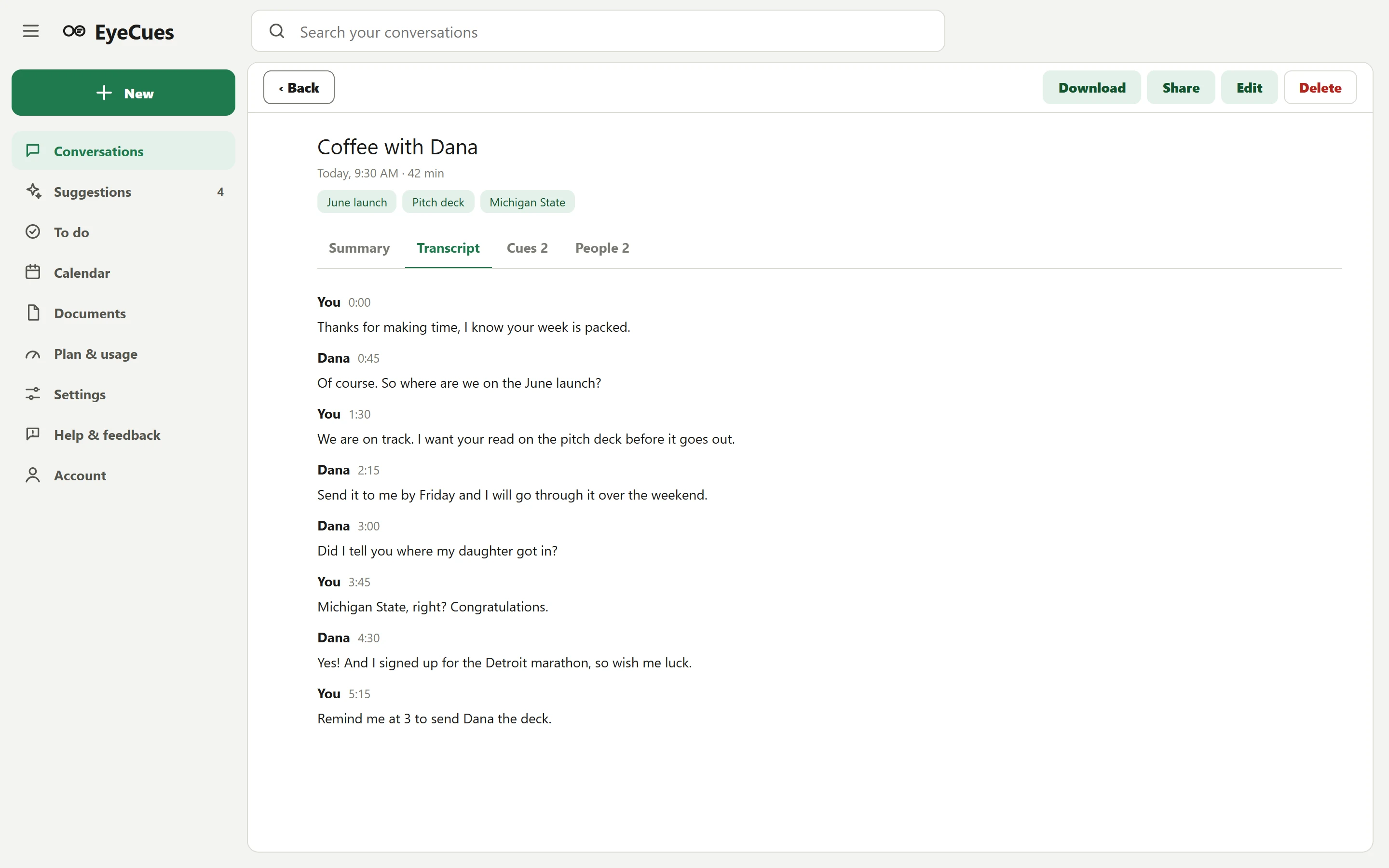
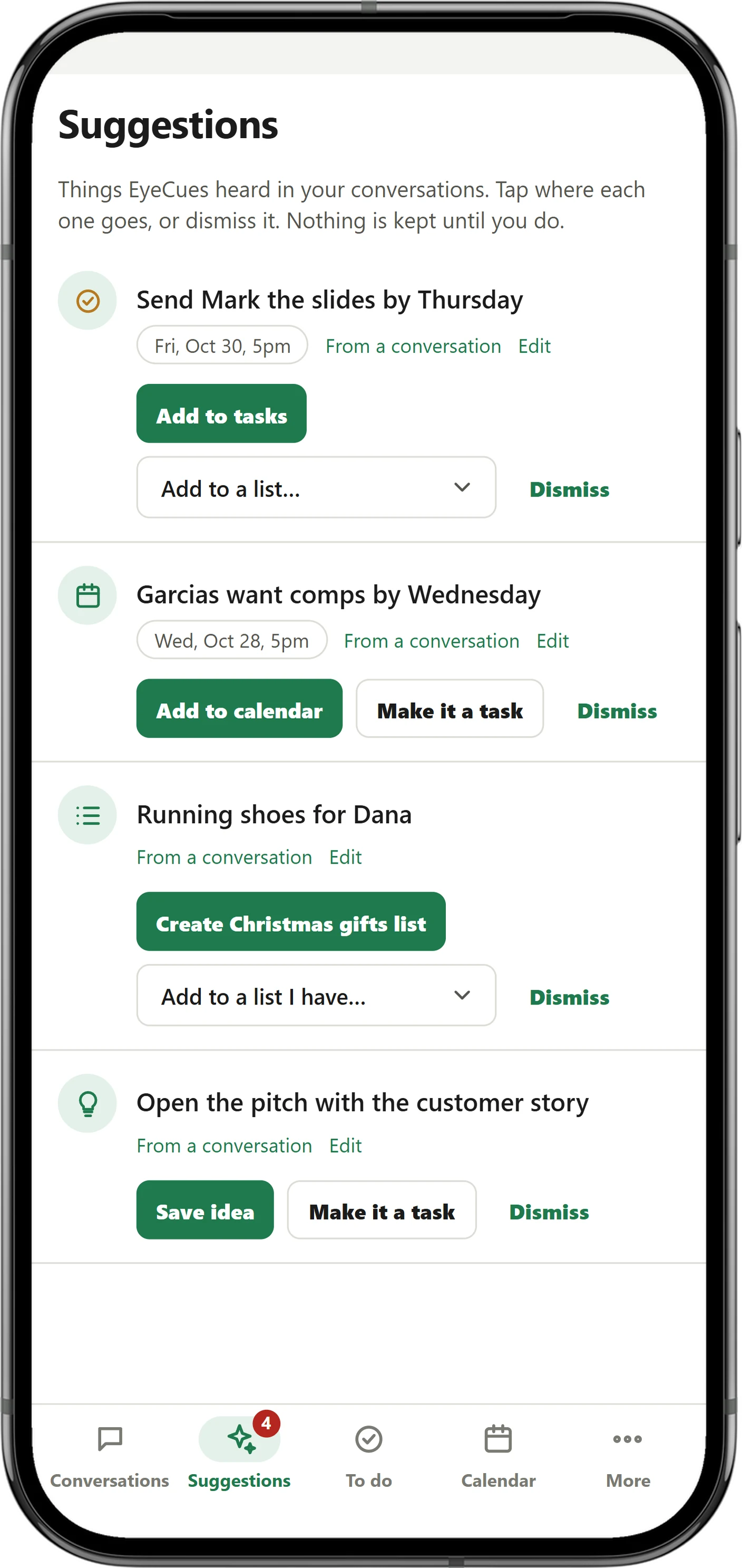
Eighteen things it does for you. Pick one from the list, or open the full list for the steps and the exact words to say.
The buyers ask "How old is the roof?"
No wake word and nothing to tap. EyeCues hears the conversation, notices a real question, and puts a short answer on your lens with where it came from: your document and page, an earlier conversation, or general knowledge.
You say "Take me to my 3 o'clock."
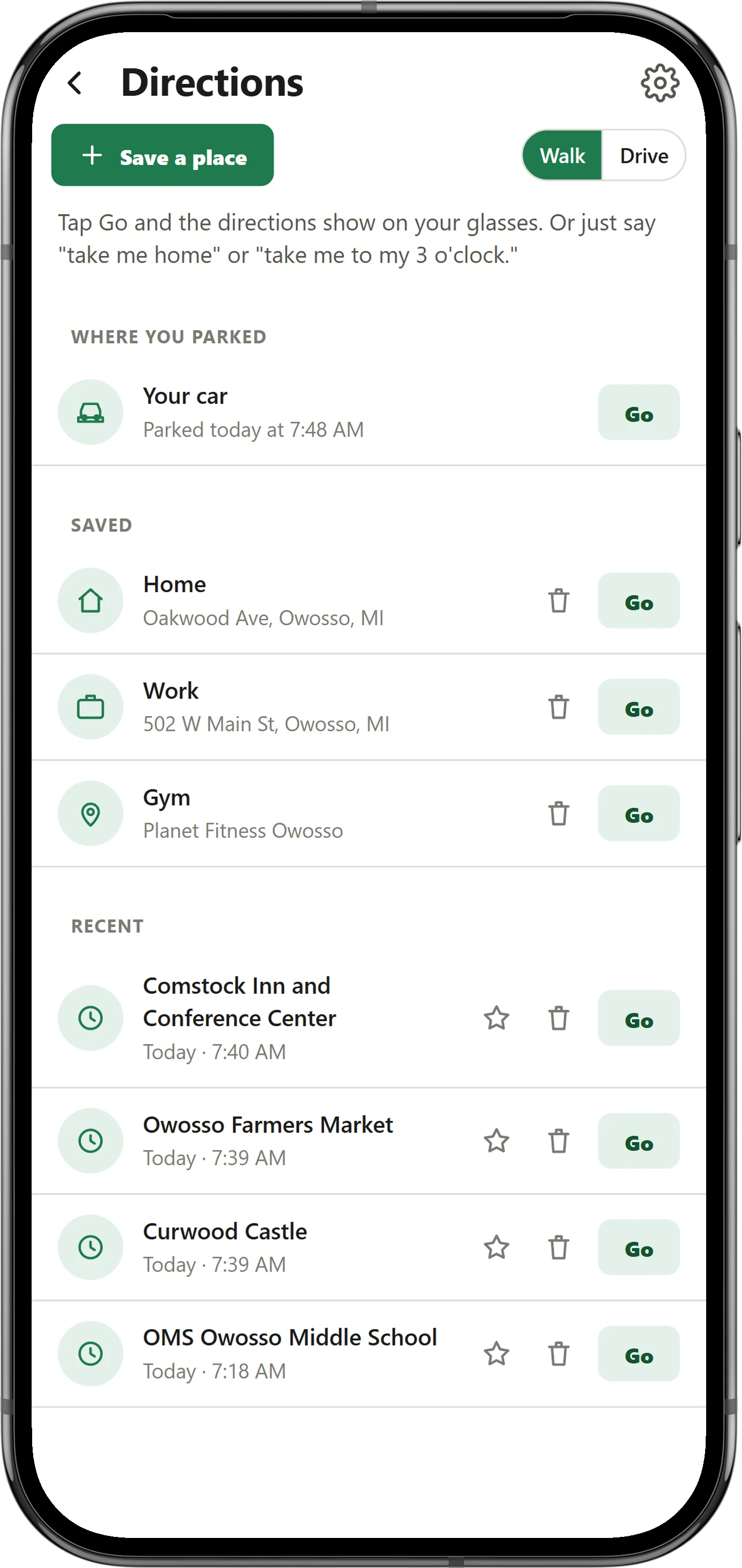
Say where you want to go and the next turn shows on your lens: the arrow, how far, the street, and the minutes left. EyeCues already knows the address from your calendar or an earlier conversation, and if you miss a turn it finds a new route on its own.
They ask "Is the hardware store still open?"
News, last night's score, a stock price, whether a store is open: when the answer changes every day, EyeCues looks it up live and puts it on your lens in a sentence, with the website it came from. Your documents, calendar and past conversations always come first.
They say "Claro. Siga recto dos cuadras y gire a la izquierda en la farmacia."
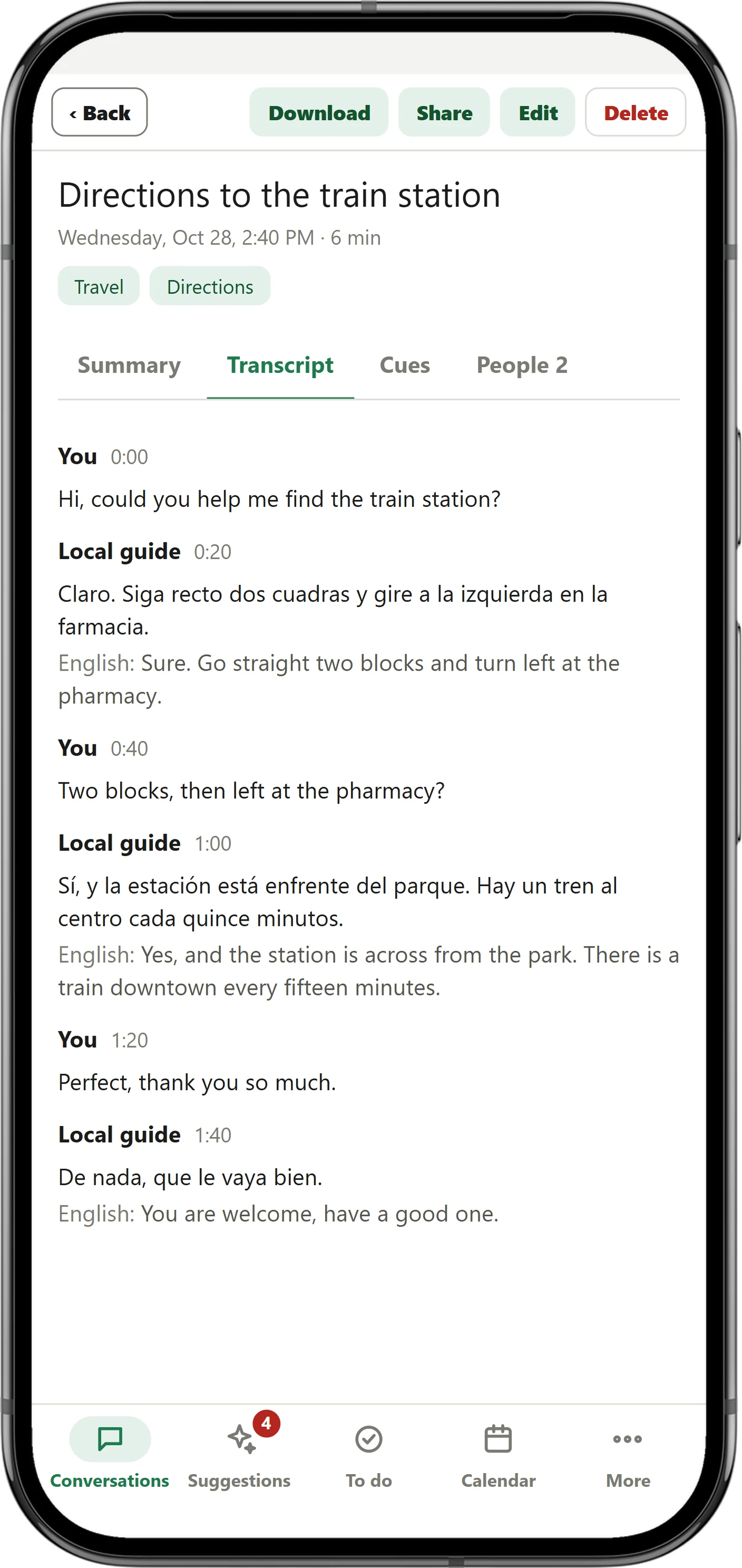
When someone speaks another language, your lens shows what they are saying in yours while they are still talking, with the language at the top, like Spanish to English. Nothing to tap and nothing to set up first. Afterward, the conversation keeps both: their exact words, and the translation under each line.
You read the answer out loud
Say "let me read the sales pitch" or "open the employee handbook to chapter 3" and that document opens on your lens, right at that spot. Or tap it in Documents on your phone, and choose to keep it up or for how long. Every answer works the same way. Read out loud and EyeCues follows your voice: a page of lines stays still, each word goes dark as you say it, the next page appears when you finish the last line, and it waits for you instead of closing mid-sentence.
Someone in the third row scans your code and asks
Start questions for your talk and a QR code comes up. The audience scans it, asks from their phones and votes up what they want answered most. Each question reaches your lens with a suggested answer from your own talk, documents and notes. Say "next question" and the most-voted one comes up.
At 3:00 a reminder comes due
EyeCues is built to stay on your face from morning to night. The lens stays calm, and the only things that appear without you asking are answers, reminders and timers when they are due, and a heads-up when your hours run low.
Later, you ask "What did Dana say about the launch?"
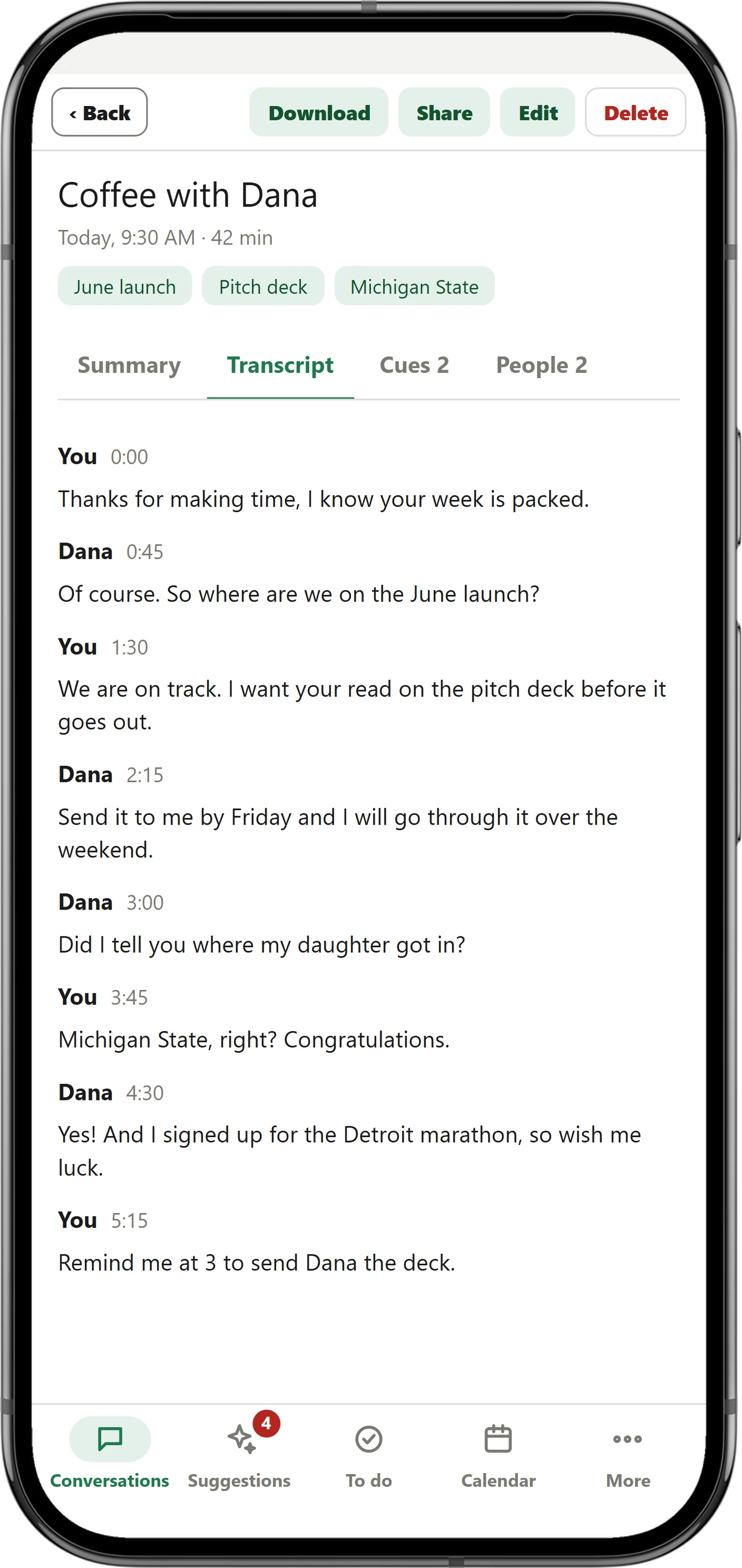
When a conversation ends, EyeCues saves it with a title, a summary, topics, the full transcript, the answers it showed you, and who said what. Ask about it later, out loud, and the answer comes back on your lens.
The meeting ends and you end it from the menu
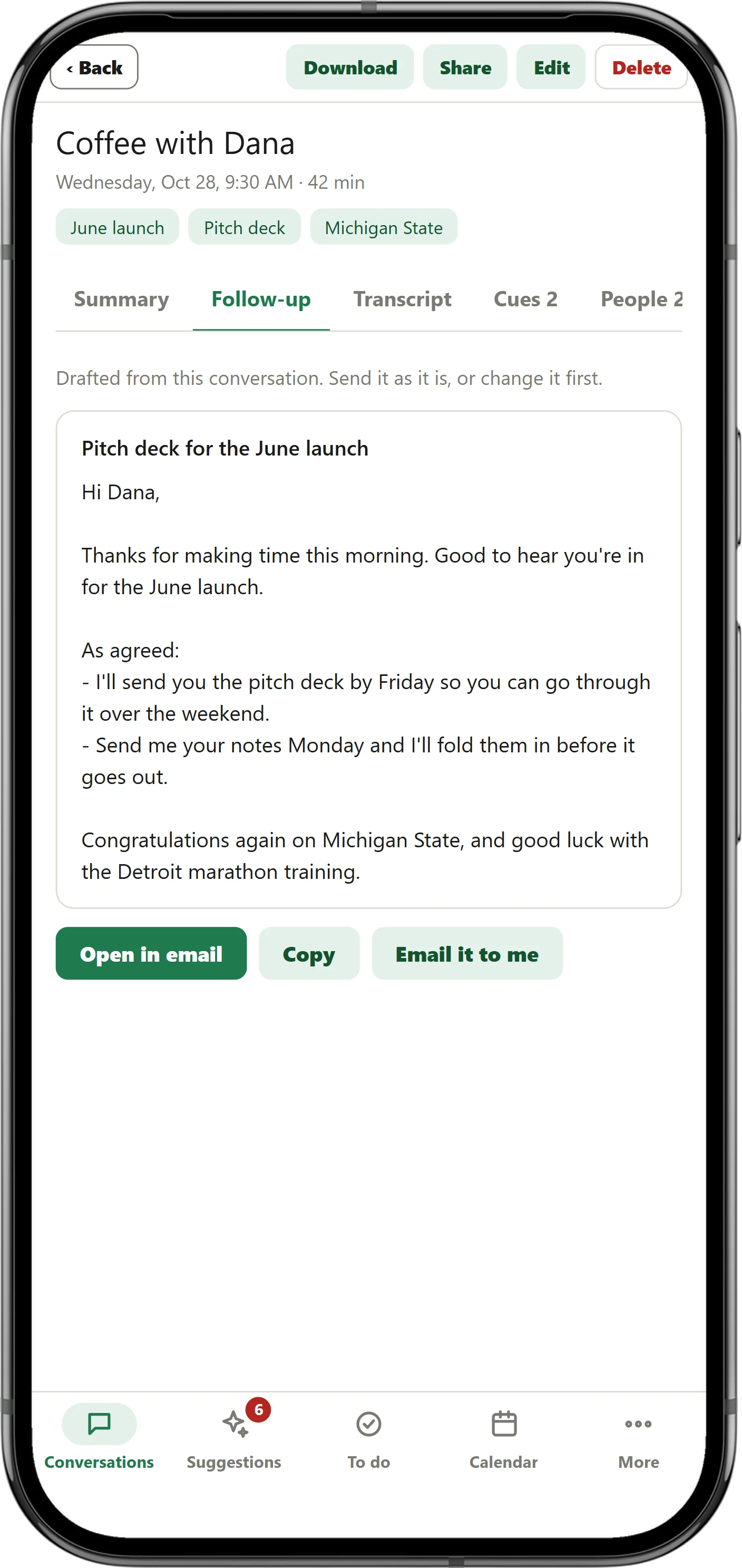
When a conversation with someone ends, EyeCues drafts the email you would send them: thanks, what was agreed, and the next steps with the dates and names. Open the conversation, tap Follow-up, and send it from your own email, or copy it anywhere.
You say "Add string cheese to my shopping list."
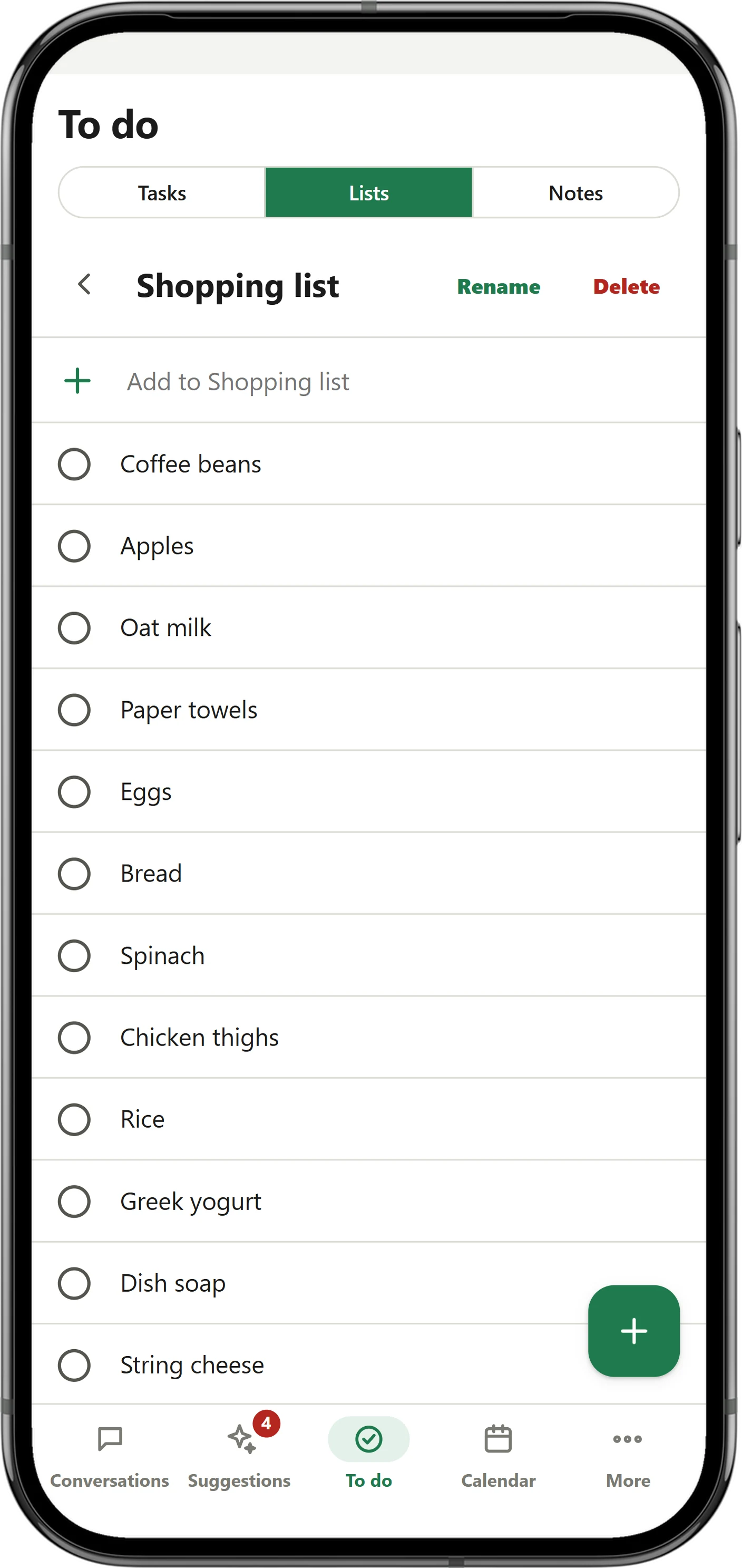
Start a camping list today, add to it next week, check it off when you pack. A Christmas list can grow for months. Ask what is on it, out loud, and it reads it to you on your lens.
You say "Put lunch with Dustin on my calendar Friday at noon."
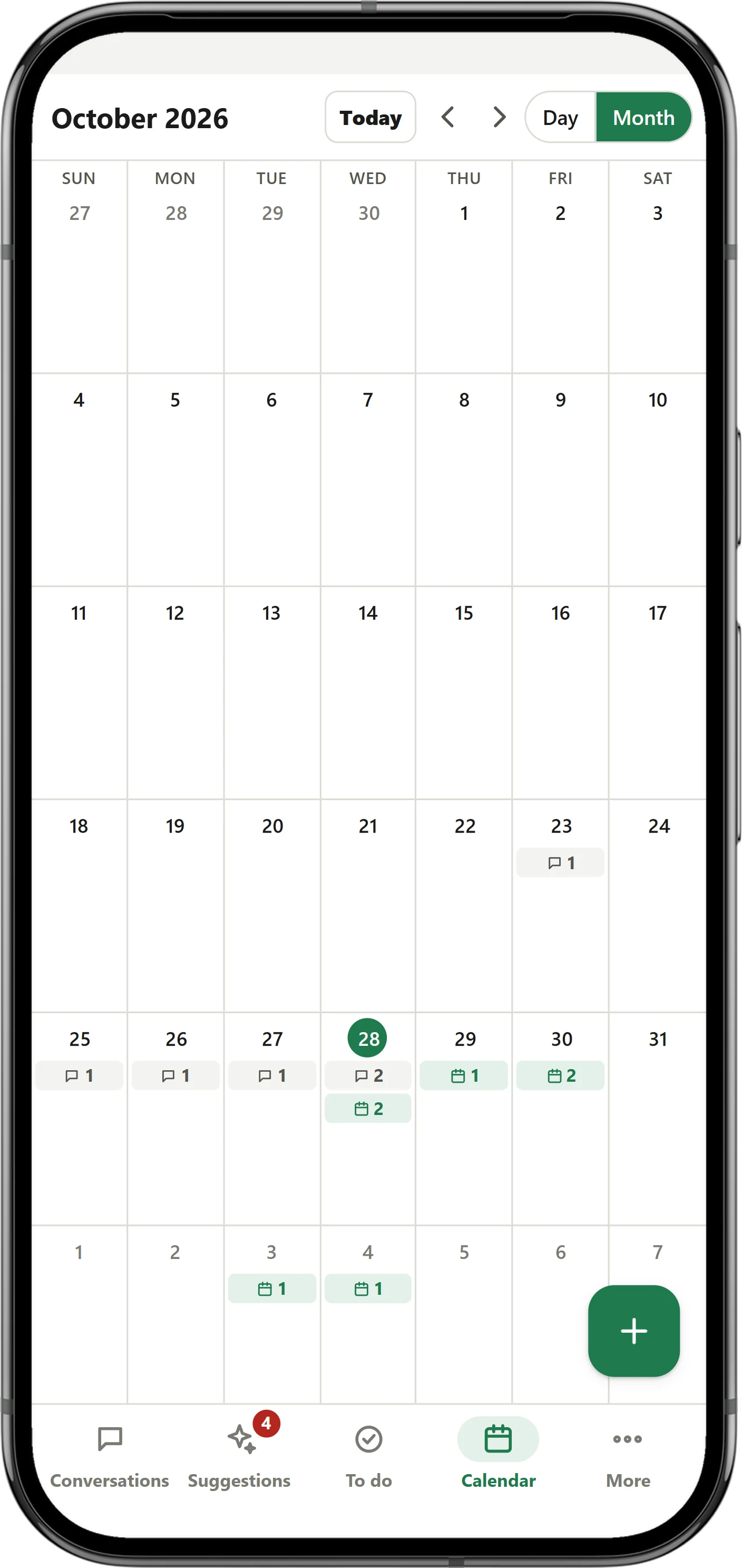
Events and reminders go out as calendar invites to your email, so they land in Google Calendar, Outlook or Apple Calendar, with a 10-minute alert. Your Google Calendar comes the other way, into EyeCues, so one calendar holds everything, with every conversation on the day it happened.
5 minutes before lunch with Dana
A few minutes before anything on your calendar, the lens tells you what it is, what you last talked about with those people, and what is still open between you. Nobody has to ask. It comes from your past conversations and to-dos, for meetings you made in EyeCues and ones from your Google Calendar.
You say "I need to renew my passport before the March trip."
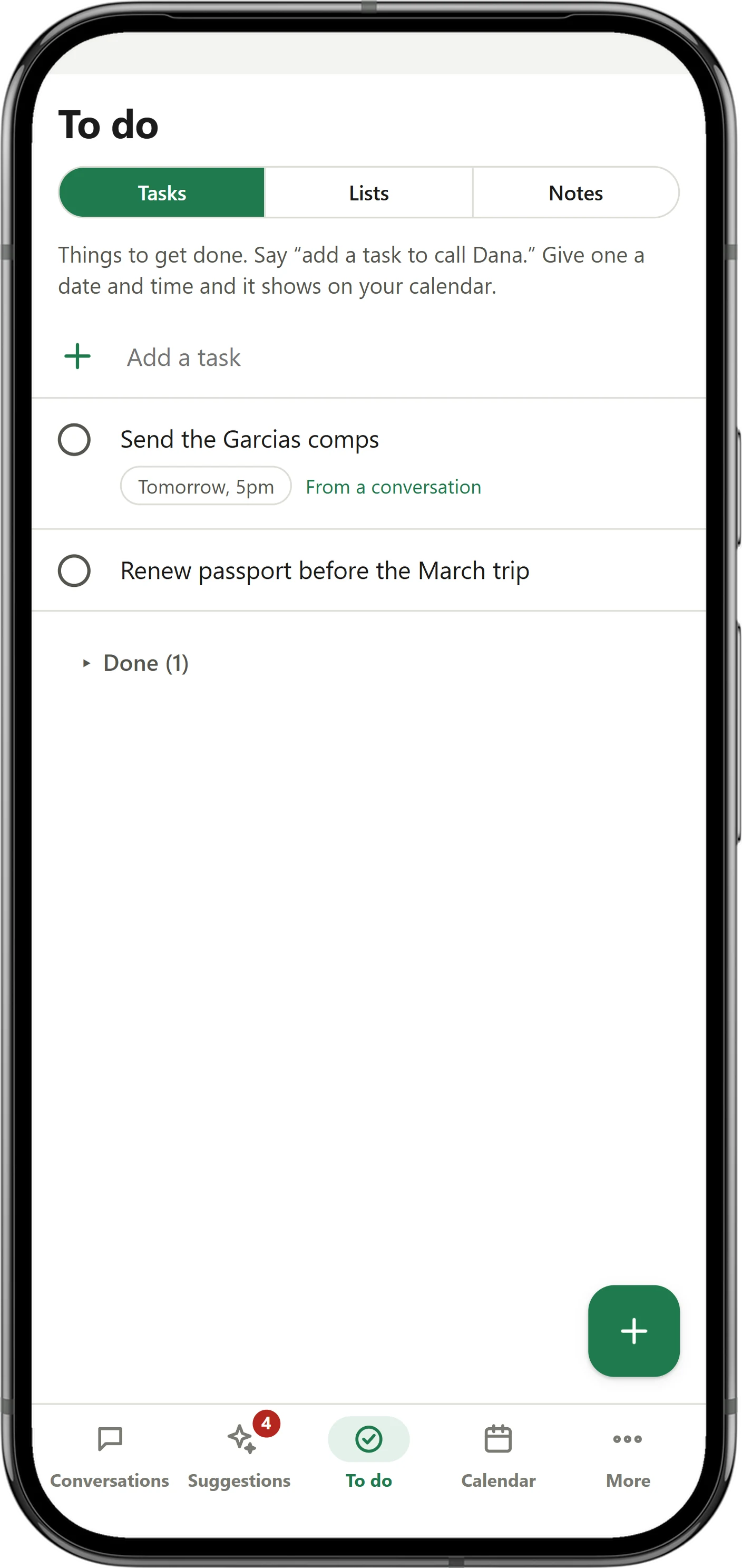
Say what you need to do, a thing to remember, or an idea worth keeping. Tasks, notes and ideas land in To do. Reminders and timers show on your lens when they are due, and reminders you missed while EyeCues was closed show up the next time you open it.
In the meeting, someone says "Send Mark the slides by Thursday."
People mention dates, promises and gift ideas without stopping to write them down. After each conversation, EyeCues picks those out and waits for you. Nothing is added until you say so.
You have been pitching for a while
EyeCues counts whose words fill the conversation. When yours pass three quarters of the last five minutes, a short note shows on the lens, so you can ask a question and let them talk.
The patient asks "When do I come back?"
Handbooks, manuals, price sheets, scripts, care plans and notes. Add them once and answers come from them first, naming the document and page.
They say "This sounds too expensive for us."
Mark a sales script, a price list or your talking points as your playbook. When someone pushes back or asks something it covers, your answer is on the lens in your own words, without saying a thing to EyeCues.
Your Google Drive the EyeCues folder
Ask Claude: "Read my EyeCues folder and list every promise I made this week."
Everything EyeCues saves is yours to take. Download it to your computer as PDF, Word or text, or let EyeCues copy every conversation into your Google Drive as plain text files, where Claude, ChatGPT, Obsidian or any tool you use can read it.
Settings on your phone or at myeyecues.com
Answers can close on their own after 7 seconds, or anywhere from 2 to 60, so you never have to tap. The lens can stay dark until there is something to show. A handful of settings, the same on your phone and at myeyecues.com, and four gestures on the glasses.
On your phone, tap the gear at the top right. At myeyecues.com, open Settings in the menu.
EyeCues connects to the AI you already use. Your conversations, lists, to do and calendar go with you, so when you ask "what did Dana say about the launch?" you get a real answer, from what Dana really said.
It works the other way too. Ask your AI to plan a trip or sort your week, and it puts the results right back into EyeCues: on your lists, your to do and your calendar, where your glasses can show them.


Asked to plan a camping weekend, Claude filled the Camping list in EyeCues. The phone shows it right away.


Gemini shows exactly what it will add and waits for your Allow. The call lands on your EyeCues calendar.
Real screens, connected to an EyeCues sample account.
What did Dana say about the launch last week?It finds the conversation and tells you what she actually said.
Plan our camping trip and put what we need on my Camping list.It plans the trip and fills your list. Your glasses can read it back at the store.
Put a call with Priya on my calendar Tuesday at 10.It adds the event, the same as saying it to your glasses.
Turn this morning's team meeting into an email to Mark.It writes the email from what was really decided.
What did I promise people this week?It lists every commitment, with who and when.
Add these notes as a document so my glasses can answer from them.EyeCues answers from it in your next conversation.
Set it up once, in about a minute. No code and no keys: paste one address and press Allow.
Show me howYou paste one address into the AI app you already use and press Allow. There is no code, no key and nothing to install. If you can copy and paste, you can do this.
It's the same for everyone. Your sign-in is what ties it to your account.
Add it where your app connects to other apps. The steps for each app are below.
Your app opens EyeCues. Sign in, choose Read and add or Read only, and press Allow.
https://myeyecues.com/mcp
On claude.ai and the Claude desktop and phone apps, every plan including Free.
On ChatGPT plans that include Developer mode.
On gemini.google.com, where Google offers custom apps. Once added, it works in the Gemini phone app too.
On grok.com and the Grok phone apps, on plans that include custom connectors.
On Perplexity Pro and higher plans.
Developers: build your own connections to EyeCues with a key and plain HTTPS. See the developer guide
A client asks a tough question, and the exact answer is on your lens before you would have reached for your phone. You never break eye contact. Other glasses apps make you get ready first; EyeCues skips all of it. Open it and it is listening.
You open EyeCues
No mode to pick, no start button, no notes to choose for today. Put your glasses on and talk.
The buyers ask "How old is the roof?"
Replaced in 2021.
Ask out loud the way you’d ask a person. It knows when a question is for it, and stays quiet when it isn’t.
The client asks "What’s the warranty on parts?"
10 years on parts, 1 year on labor.
Add a document once. Every one of them is searched for every question, and the answer names the document and page.
You read it out loud
Thanks for having me. Today I want to show you our results.
Read any answer or document out loud and the lens follows your voice word by word, so it sounds like it came off the top of your head.
You ask "What time did she say the inspection is?"
Thursday at 2:00 PM.
It answers from this conversation or any one before it, like "What did Dana say about the launch?"
You say "Lunch with Dustin Friday at noon."
Added: Lunch with Dustin, Friday 12:00 PM.
Calendar invites, reminders, lists, tasks and timers, and even settings: "make the lens dimmer."
She says "¿Dónde está la estación de tren?"
Where is the train station?
When someone speaks another language, the translation appears while they talk. Nothing to switch on.
Your calendar Call with Priya at 10:00
Priya wants the revised quote today.
A short brief on your lens before each meeting, from your past conversations and open to-dos.
They say "Nice weather today, huh?"
The lens stays quiet until something matters, and silence never counts against your hours.
| EyeCues | Others | Even Conversate | |
|---|---|---|---|
| How easy it is | |||
| Start listening | Open it. That’s it. | Usually pick a mode first | Choose a microphone and a Prep Note, then press Start |
| Ask a question | Just ask, no wake word or button | Varies by app | Cues come on their own; asking Even AI takes “Hey Even” |
| Use your documents | Add once; all of them are used every time | Files loaded per mode, 5 files of 5 MB | One Prep Note per conversation (5 files of 5 MB), or the beta Knowledge Base |
| Change a setting | Say it: “make the lens dimmer” | In the app | In the app; the microphone can’t change once started |
| API keys or setup | None, on any plan | Often, on free plans | None |
| What it does | |||
| Answers on your lens | Yes | Yes | Yes |
| Answer names the document and page | Yes | ||
| Ask what was just said | Yes | ||
| Every conversation saved and searchable | Yes, on your phone and at myeyecues.com | Yes | Yes, in the Even app |
| Teleprompter that follows your voice | Any document or answer, opened by voice, every plan | Usually Pro only | Teleprompt, a separate app for scripts |
| Calendar invites made from what you say | Yes, to any calendar | Usually Pro only | |
| Reminders, lists, tasks and timers by voice | Yes | Some | Next steps added to a list after |
| Brief before each meeting, from your calendar | Yes | ||
| Sales playbook: answers objections as they come up | Yes | ||
| Audience questions and a talk-time coach | Yes | Audience questions | |
| Full web account with calendar, documents and downloads | Yes | ||
| Works with ChatGPT, Claude, Gemini, Grok and Perplexity: they can read your conversations and add to your lists and calendar | Yes, set up in a minute, no code | ||
| Google Drive sync | Yes | Yes | Export only |
| Price | |||
| Monthly price | Free, $14.99 or $29.99 a month | A paid Pro plan for the full app | Included with the glasses; Pro Mode is in beta, price not announced |
| When the free part runs out | 5 free hours in your first 30 days | A few sessions, then your own AI keys or Pro | Free; Pro Mode has a monthly allowance |
Others means other assistant apps for Even G2. Based on each company’s public pages, November 2026.
Only time there's talking counts, from anyone nearby, including a TV or music with voices. Silence is free. TV on? Say "stop listening", or press and hold and pick Pause listening. Tap to listen again. Paused time never counts. See how much you have used, and change plans, under Plan and usage in EyeCues or at myeyecues.com. In a busy month, add 20 more hours for $9.99 on any paid plan.
5 hours of listening over your first 30 days.
40 hours of listening a month.
85 hours of listening a month.
300 hours of listening a month.
EyeCues asks for your name and email the first time you open it, and sends a code to confirm it's you. Your conversations, lists and plan belong to that account. Only phones you approve can use it, and nobody else's data ever mixes with yours.
EyeCues is an app for Even G2 smart glasses. It listens to the conversation you are in and puts the answer on your lens while the conversation is still going. It translates other languages live, and it saves every conversation with a summary, along with your lists, reminders and calendar.
Even G2 by Even Realities. You install EyeCues from the Even Hub, inside the Even app on your phone.
The free trial gives you 5 hours of listening over your first 30 days. Standard is $14.99 a month for 40 hours, or $149.99 a year. Pro is $29.99 a month for 85 hours, or $299.99 a year. Executive is $99.99 a month for 300 hours, or $999.99 a year. On a paid plan you can add 20 more hours for $9.99 in a busy month. Live web search, for news, scores, prices and anything current, includes 10 searches on the trial, 75 a month on Standard, 175 on Pro and 600 on Executive; add 100 more for $4.99. When they run out, everything else keeps working. Every plan has every feature, and only time there's talking counts. Silence and paused time are free.
26 languages: English, Spanish, French, German, Italian, Portuguese, Dutch, Polish, Russian, Ukrainian, Turkish, Arabic, Hebrew, Hindi, Chinese, Japanese, Korean, Vietnamese, Thai, Indonesian, Tagalog, Swedish, Greek, Romanian, Czech and Hungarian. When someone speaks a language that isn't yours, your lens shows what they are saying in your language while they talk.
No audio is saved. Sound is turned into text as it happens, and EyeCues keeps the text so you can search it later. Your data is never sold, never used for ads and never used to train AI models, and you can delete any conversation or your whole account.
No. Install it, enter your name and email, and start talking. There are no API keys on any plan.
Yes. Connect ChatGPT, Claude, Gemini, Grok or Perplexity in about a minute, with no code. Then you can ask them about anything you heard, and they can add to your lists and calendar.
Yes. When you ask something that changes every day, like news, a score, a stock price or whether a store is open, EyeCues searches the web and shows a short answer on your lens with the website it came from. Every plan includes live searches each month, and only questions that need the internet use one.
Yes. Say where you want to go, or ask for the closest gas station or restaurant, and directions show on your lens turn by turn. EyeCues already knows addresses from your calendar and past conversations, and it can walk you back to where you parked.
Yes. Sign in at myeyecues.com to see your conversations, lists, calendar and documents on a bigger screen, and to download everything.
Start free with 5 hours in your first 30 days. No API keys and nothing to set up.
Open the Even app on your phone, go to the Even Hub, and install EyeCues. EyeCues works with Even G2 smart glasses by Even Realities.
Open EyeCues. Enter your name and email, then the code we send you. That's your EyeCues account.
Put on your glasses. EyeCues listens, answers, and saves. Sign in here any time to see it all on a bigger screen.
Don't have Even G2 glasses yet?
Get Even G2 from Even Realities